

MailClean by Globyn Lifetime Deal Review: Clean Email Lists Before You Send
Quick answer: MailClean by Globyn is an email verification and list-cleaning platform for marketers, agencies, cold email teams, SaaS founders, and CRM managers who need to remove invalid, fake, risky, disposable, catch-all, and unknown email addresses before sending campaigns. The lifetime deal is most attractive if you verify lists repeatedly and want daily credits without another recurring software bill.
Email marketing still looks simple from the outside: collect leads, write a campaign, press send, and wait for replies. In practice, one messy list can damage deliverability fast. A high bounce rate can hurt sender reputation, reduce inbox placement, waste campaign budget, and make your CRM look bigger than it really is. That is where a tool like MailClean by Globyn becomes useful.
MailClean focuses on one core job: verify email addresses before you send. You can run a quick single-email check, process bulk lists, review deliverability results, and export cleaner segments for outreach or newsletters. According to the public product listing on UIComet, MailClean detects invalid, fake, and risky emails to reduce bounce rates and improve deliverability. The official MailClean app also shows verification statuses such as Safe, Risky, Invalid, Catch-All, and Unknown, with credit-based billing for successful verification results.

What Is MailClean by Globyn?
MailClean by Globyn is an email verification service built for cleaning lists before campaigns. It is designed to help users upload or paste email addresses, verify them, categorize the results, and export a cleaner list for sending. The platform’s visible product copy describes it as a service for removing invalid, temporary, and unsafe addresses to protect sender reputation.
In simple terms: MailClean is an email list verification tool that checks whether addresses are likely safe to email, risky, invalid, catch-all, or unknown so senders can reduce bounces before running campaigns.
That matters because deliverability is not only about the email copy. Even a good campaign can perform poorly if the list has dead inboxes, typo addresses, disposable accounts, spam traps, or addresses that cannot be confidently verified. MailClean does not replace permission-based list building, warmup, or good campaign practices, but it can become a practical cleaning layer before outreach.
MailClean Lifetime Deal Pricing
The live MailClean public plans endpoint showed four active lifetime tiers during my August 8, 2026 check:
| Plan | One-time price | Daily credits | Bonus instant credits | Best fit |
|---|---|---|---|---|
| Starter Lifetime Deal | $99 | 700/day | 150,000 | Freelancers, small newsletters, light cold email |
| Growth Lifetime Deal | $199 | 1,800/day | 350,000 | Agencies and small sales teams |
| Business Lifetime Deal | $499 | 3,500/day | 500,000 | High-volume outreach teams |
| Enterprise Lifetime Deal | $999 | 6,500/day | 1,000,000 | Larger teams with recurring list cleaning needs |
MailClean also offers monthly subscriptions and instant credit packs, but the lifetime deal is the main value angle here. The key difference is that lifetime plans use a one-time payment model with daily credits that reset every 24 hours plus a bonus instant-credit balance. Daily credits are useful for ongoing cleaning habits, while instant credits are useful when you have a larger list to process immediately.
You may also read

Spellar AI Lifetime Deal Review: Should You Buy It Now?
Spellar AI lifetime deal review covering bot-free meeting notes, summaries, action items, pricing, pros, cons, and AppSumo buying fit.
One thing to notice: the public app text and API data are not perfectly consistent in every visible label. For example, some plan feature text mentions different daily-credit numbers than the structured daily_credits_limit values. For this review, I am using the structured live plan values as the more precise pricing reference and recommending that buyers recheck the checkout page before paying.
Main Features
MailClean is not trying to be an all-in-one email marketing suite. Its strongest use case is verification before sending. The most important features are:
- Single email verification for checking one address quickly.
- Bulk email verification for larger lead lists, with the app copy indicating support for up to 1 million email addresses.
- Result categories such as Safe, Risky, Invalid, Catch-All, and Unknown.
- Export options for clean or full audit lists.
- API access for programmatic email verification.
- Webhooks for events such as completed or failed verification tasks.
- Credit history so teams can track usage.
- Daily free credits and instant credits depending on plan.
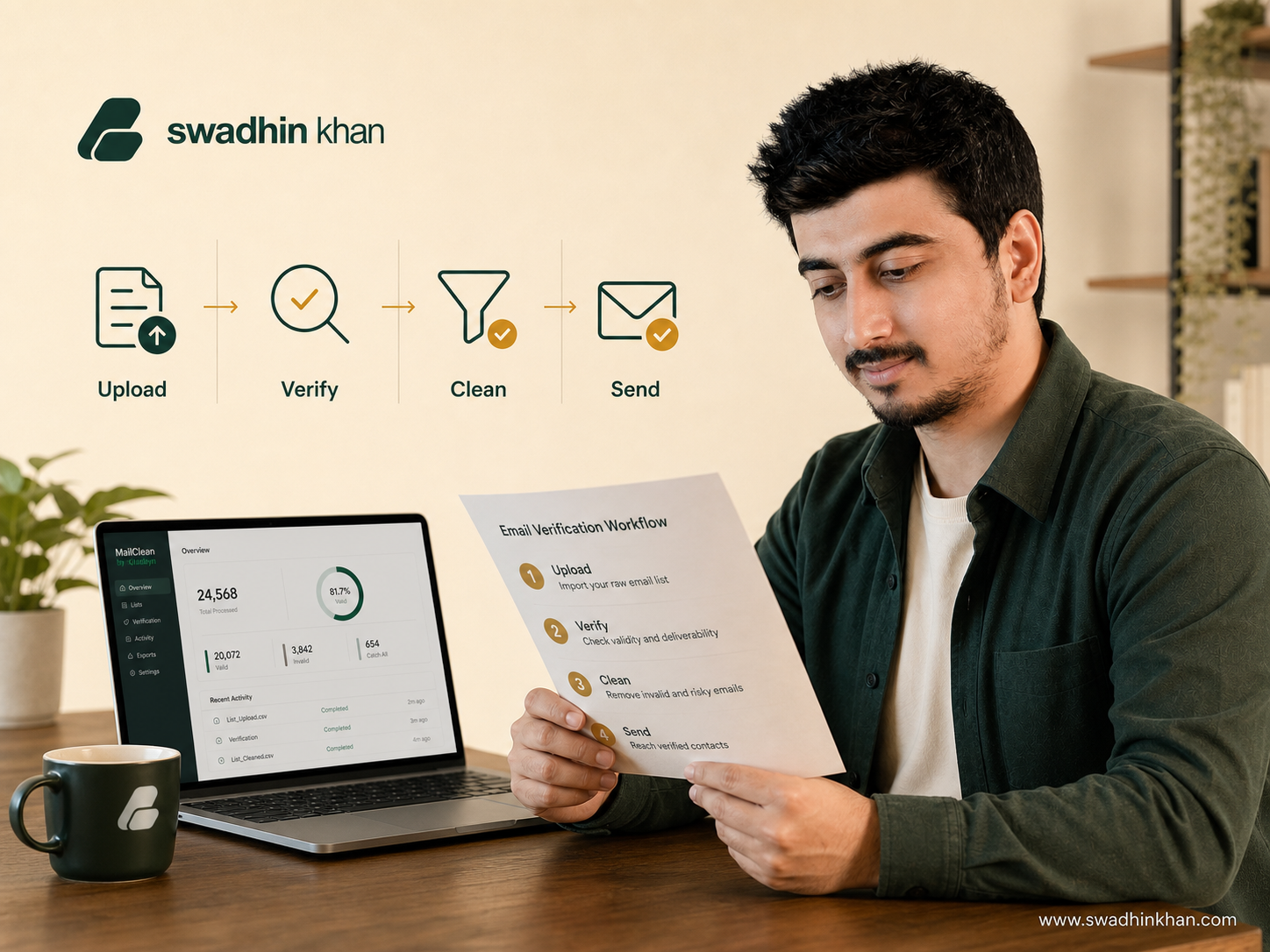
For a small business, the basic workflow is straightforward: upload the list, run verification, remove risky or invalid addresses, then import the clean segment into your email platform or CRM. For an agency, the same workflow can become a standard pre-campaign quality check for every client list.
Why Email Verification Matters
Email verification is valuable because every bad address creates friction. Invalid addresses create hard bounces. Risky addresses may reduce campaign quality. Disposable addresses often add low-intent contacts. Catch-all domains can be real, but they are harder to confirm because the server may accept mail for many addresses without proving that a specific mailbox exists.
MailClean’s Unknown result is also important. The app explains that Unknown can happen when the system cannot fully verify delivery status due to server restrictions, and it says Unknown results do not consume credits. That is a fair design choice because email verification is not magic. Some mail servers intentionally hide mailbox-level status to protect users from abuse.
This is also why a clean list should never be treated as permission. Verification answers “can this address likely receive email?” It does not answer “did this person ask to hear from you?” The best results come when verification is combined with opt-in collection, relevant targeting, sensible sending volume, and clear unsubscribe handling.
Who Should Buy MailClean?
MailClean makes the most sense for people who repeatedly work with email lists. If you clean a list once per year, a one-time instant credit pack from any verifier may be enough. If you verify leads every week, import CRM data often, or run ongoing outbound campaigns, the lifetime model becomes more interesting.
It is a strong fit for cold email teams that want to reduce hard bounces before pushing lists into outreach tools. It is also useful for agencies that receive messy CSV files from clients and need a simple way to separate safer contacts from risky ones. SaaS founders can use it before product launches, waitlist updates, or reactivation campaigns. Newsletter operators can use it when consolidating older lists, especially if they have not emailed those subscribers in a long time.
You may also read
Swiftspeed Lifetime Deal Review: Should You Buy It Now?
Swiftspeed lifetime deal review covering AI app building, native iOS and Android publishing, pricing, pros, cons, and AppSumo buying fit.
MailClean is less suitable if you need a full sending platform, newsletter builder, automation builder, CRM, or inbox warmup suite. It is a verification tool first. You will still need separate tools for campaign design, sequencing, analytics, and replies.
Pros and Cons
The biggest advantage of MailClean is focus. The interface and plan structure are built around verification credits, bulk tasks, exports, and API usage. That makes it easier to understand than a bloated email marketing platform where verification is only one small feature.
Another advantage is the lifetime pricing. A one-time $99 to $999 payment can be attractive if your team cleans lists every month. The bonus instant credits add practical value because they let you process a larger batch after purchase instead of waiting for daily credits to reset.
The public stats endpoint also showed more than 10 million verified emails and 151 active users at the time of checking. That is not enough by itself to prove long-term reliability, but it is a useful public adoption signal for a newer or smaller tool.
The main downside is that public documentation is still lighter than mature enterprise tools. The app exposes API and webhook sections, but buyers should review documentation, export formats, support response expectations, and refund terms before buying a higher tier. Also, because pricing labels and structured plan values show a few inconsistencies, the final checkout screen should be treated as the source of truth.
Best Use Cases
MailClean is best used before a campaign goes live. A practical workflow looks like this:
- Export leads from your CRM, form tool, or prospecting workflow.
- Upload or paste the list into MailClean.
- Run verification and wait for the task to complete.
- Export Safe contacts for your primary campaign.
- Review Risky, Catch-All, and Unknown contacts separately.
- Remove Invalid and disposable addresses from your sending list.
- Keep the verification report for client or team reporting.
For agencies, this can be turned into a client deliverable: “We cleaned 25,000 records, removed invalid addresses, separated catch-all domains, and exported the safe segment for campaign launch.” That is more professional than blindly importing every lead.
MailClean Alternatives
MailClean competes with tools such as Reoon Email Verifier, NeverBounce, ZeroBounce, Bouncer, MillionVerifier, and other email verification platforms. The right comparison depends on volume, accuracy expectations, integrations, API needs, and pricing model.
If you want the most established enterprise ecosystem, a bigger brand may offer more integrations and compliance documentation. If you want a lean tool with daily credits and a lifetime payment option, MailClean is worth a closer look. The buying decision should come down to your monthly verification volume, the importance of API access, and whether the lifetime credits match your real sending workflow.
You may also read
Reelify AI Lifetime Deal Review: Should You Buy It Now?
Reelify AI lifetime deal review covering AI short clips, local Mac processing, pricing, pros, cons, and AppSumo buying fit.
Verdict: Is MailClean by Globyn Worth It?
MailClean by Globyn is worth considering if you regularly clean email lists and want a lifetime deal instead of a recurring verification bill. The strongest value is for marketers, agencies, and sales teams that verify lists every week or every month. The daily-credit model encourages ongoing hygiene, while the bonus instant credits help with larger one-time imports.
I would start with the Starter or Growth lifetime tier if your volume is moderate and you mainly need list cleaning before campaigns. Consider Business or Enterprise only if you already know your monthly verification volume is high enough to justify the upfront cost.
The cautious recommendation is simple: buy MailClean if email list cleaning is part of your normal workflow, not if you only need a verifier once. Check the live checkout page, confirm the exact credits included, test a small list first, and then decide whether the lifetime deal fits your sending volume.
FAQ
What is MailClean by Globyn?
MailClean by Globyn is an email verification and list-cleaning tool that helps users identify safe, risky, invalid, catch-all, and unknown email addresses before sending campaigns.
Does MailClean have a lifetime deal?
Yes. The live public plans data checked on August 8, 2026 showed active lifetime plans from $99 to $999 one-time, with daily credits and bonus instant credits.
How many emails can MailClean verify?
The MailClean app copy says bulk verification can handle up to 1 million email addresses. Exact processing time depends on list quality, mail server response behavior, greylisting checks, and system load.
Are Unknown results charged?
MailClean’s app copy says Unknown results are not charged because the system could not fully verify delivery status due to server restrictions.
Is MailClean a cold email platform?
No. MailClean is primarily an email verification and list-cleaning service. You still need a separate sending, sequencing, CRM, or newsletter platform for campaigns.
Who should avoid MailClean?
Avoid buying a lifetime tier if you rarely verify lists, do not send email campaigns, or need an all-in-one email marketing platform instead of a verification tool.